
Hi everyone!
Sorry for the slight delay in releasing my open-source editor for the ZX Spectrum Next.
I’ve been hard at work coding the Z80 engine, and I’m thrilled to announce that it now successfully takes files directly from the editor and runs them on the Next! There’s just a little bit of polish left to add, but the finish line is in sight.

To help you understand exactly how everything works under the hood, I’ve fully commented about 99% of the Z80 source code. I also wanted to make the setup process as painless as possible.

All it takes is changing just three lines of code in the main file so the engine knows where to find your exported data. After that, you simply hit “Compile and Run” in Visual Studio Code, and your level will pop right up on the ZX Spectrum Next screen!
From TX-1696 to a Full Editor
As some of you might know, I originally wrote the base version of this editor to help me build TX-1696. I needed a way to map out levels and design movement patterns for the sprites. If you’ve played it, you might remember the tentacles on the shell boss or the legs on the giant insect boss in Level 1. Those movement patterns were key-frame based and built in a totally separate editor for those enemys.

While that workflow worked for me, it meant juggling data locations and key-frames independently—a nightmare for anyone else trying to use it! You’ll be happy to hear I’ve spent time stabilizing the tools, improving the UI, and merging everything into one main editor. Those complex key-frame movements are now built right in as a standard object type.
Meet the Object Types

To give you complete control over your levels, the editor uses a few different “Object Types.” Here is a quick breakdown of what you can do with them:
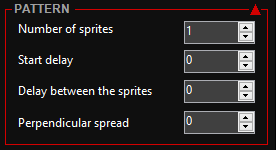
Bézier Follow Path: This lets up to 16 sprites smoothly follow a curved path. You can set a delay between them (perfect for a tightly linked worm enemy or a spaced-out wave of baddies) and even add a perpendicular offset to spread the wave out on the screen.

When they reach the end of the path, you can choose whether they reverse direction, freeze in place, or delete themselves.

Single Object: Exactly what it sounds like! Use this for static level decorations or attach your own custom controller to it.
A-B Object: Similar to the Bézier path, but it moves in straight lines between a set of specific points. It supports all the same great features of the Bézier path: multiple sprites, spread offsets, and end-of-path behaviours.
Key-Frame Type: This allows a chain of sprites to follow your custom animation key-frames. You can use linear interpolation for buttery-smooth movements or stick to fixed key-frames depending on your game’s vibe. New feature alert: I recently added Inverse Kinematics (IK), meaning you can literally just drag the chain nodes around on screen to set your key-frames!
Zones: You can draw an invisible area on your level map. Whenever another object enters this zone, it triggers your custom code. This is perfect for setting up restore points, checkpoints, or triggering enemy ambushes.
Note: For both the Bézier and A-B paths, you can drop multiple trigger points along the route to run custom code exactly when a sprite hits that spot!
Smarter Game Sprites
When I say “sprites” here, I’m not just talking about hardware sprites—I mean fully defined game entities.
The editor lets you import your sprite art as a series of animation frames. From there, you can easily define what they are (Baddies, Pickups, Ammo, or Decoration) and set their Hit Points and Score values. You can even assign custom code to run the moment they are created, when they collide with something, or when they are destroyed.
Let the Editor Do the Heavy Lifting

The ultimate goal of this editor is to take all the tedious, time-consuming grunt work off your plate so you can focus on designing a great game. Here are just a few of the things it handles for you automatically:
Tilesets & Palettes: Effortlessly generate tilesets complete with their own color palettes.

Spectrum Next Tile Maps: Build and export your tile maps directly into the native Spectrum Next format.
Mega Sprites: Easily stitch multiple hardware sprites together to create massive, imposing enemies.
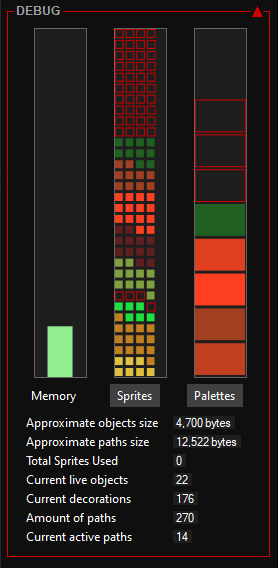
Dynamic Sprite Allocation: The editor manages your hardware sprite slots on the fly. This allows the Z80 engine to dynamically load different sprites as the player moves through different areas of your level, maximizing your memory!
Built-In Debugger: No more guessing! A visual debugger highlights exactly where you might have overlapping sprites or clashing palettes so you can spot and fix issues instantly.
Visual Scripting: No Z80 Knowledge Required!

Custom code is where I’m focusing all my attention right now, and it’s the final puzzle piece before I release the editor to you all.
I want absolutely everyone to be able to make games, even if you don’t know the ins and outs of Z80 assembly or how to juggle hardware registers. To solve this, I’m building a visual scripting system inspired by Unreal Engine’s Blueprints.

You simply choose a code block and drag connecting wires to the next block. Behind the scenes, the editor will translate your visual map into fully commented Z80 source code. If you are a programmer, there is a dedicated code block that lets you write custom Z80 directly to interact with the engine and its data structures. But if you aren’t, the built-in scripting blocks will have you covered.
What’s Next?
Once the visual scripting system is completely sorted out, I’ll be putting together a few demonstration levels across different game genres. You’ll be able to play around with them, pull them apart, and use them as the foundation for your own projects.
Stay tuned, and happy Nexting!
Cheers, Trish